The short version: your firm already knows the answer. It is spread across ten thousand PDFs, a shared drive, and the memory of whoever worked the case. The AI Paralegal reads all of it and answers questions about it, with a citation to the document every time. It runs on a machine in your office or on a private server we host, whichever the firm is comfortable with, and it is the fastest way for a firm to put AI to work on the files it already has.
The problem is not that the file is missing
An attorney asks what the treating physician said about causation in a matter that closed two years ago. The answer exists. It is in a deposition summary, or the research memo, or possibly the expert report, in a folder nobody has opened since the file closed.
So somebody starts opening PDFs. Document search in most practice management systems matches words, not meaning: search "causation" and you get every file containing the word, in no particular order, with no idea which one actually answers the question. Twenty minutes later the paragraph turns up.
That is not paralegal work. That is retrieval work, and it is the quiet tax on every day at every firm. It never appears as a line item, and it is the first thing a well built AI tool takes off the plate.
What the AI Paralegal is
A private search and question-answering layer over your firm's own documents. You decide what it knows: pleadings, deposition summaries, expert reports, research memos, settlement demands, status reports, invoices, engagement letters, internal policies, the master docket.
It reads all of it, then anyone at the firm can ask it a question the way they would ask the paralegal who has been there the longest.
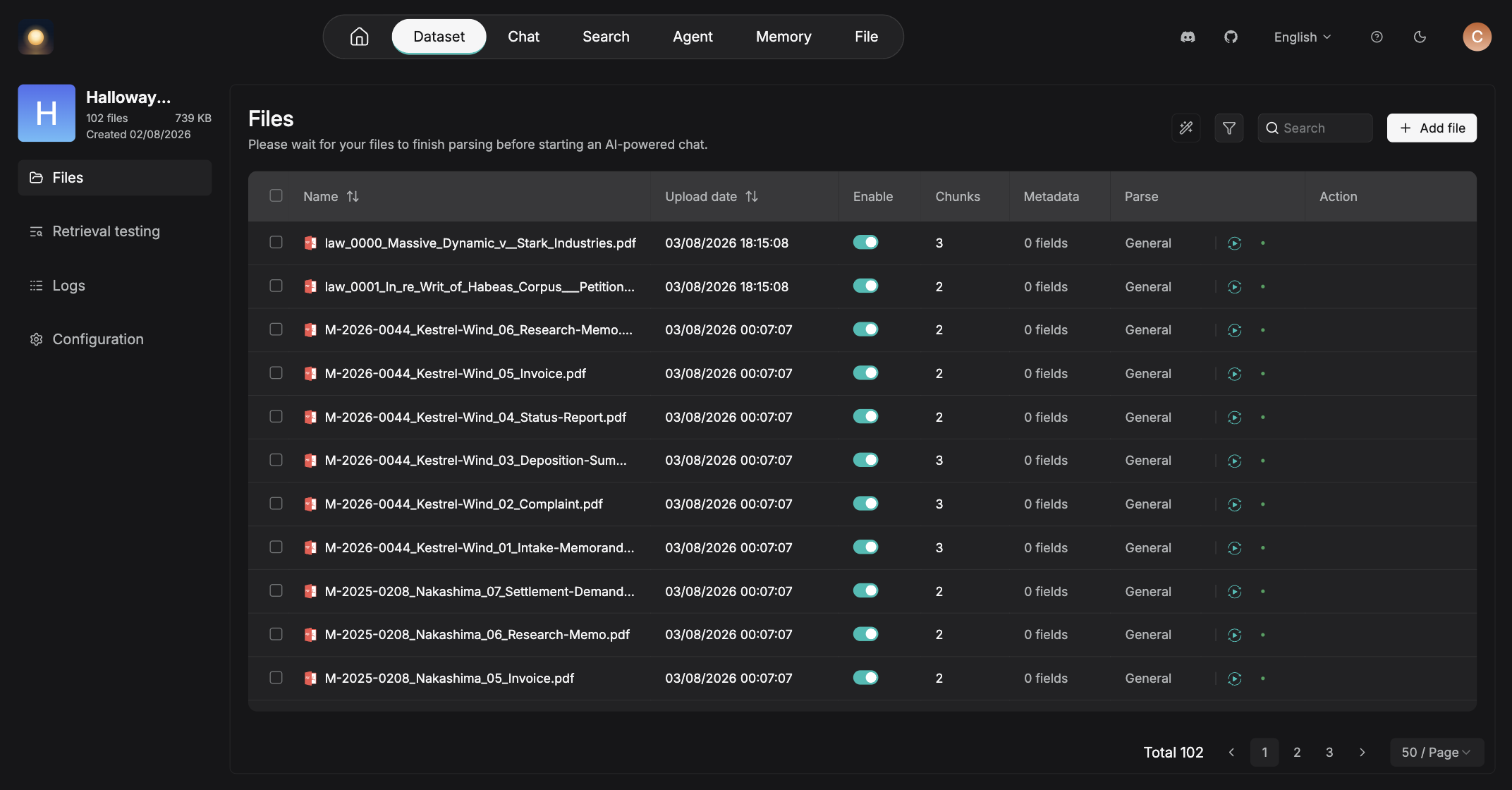
Every answer arrives with a receipt
Ask it about a matter and you get the summary, plus the documents it read to write that summary. Click a citation and you land on the passage.
Nobody has to take the machine's word for anything, which is precisely the standard a law firm should be holding it to.
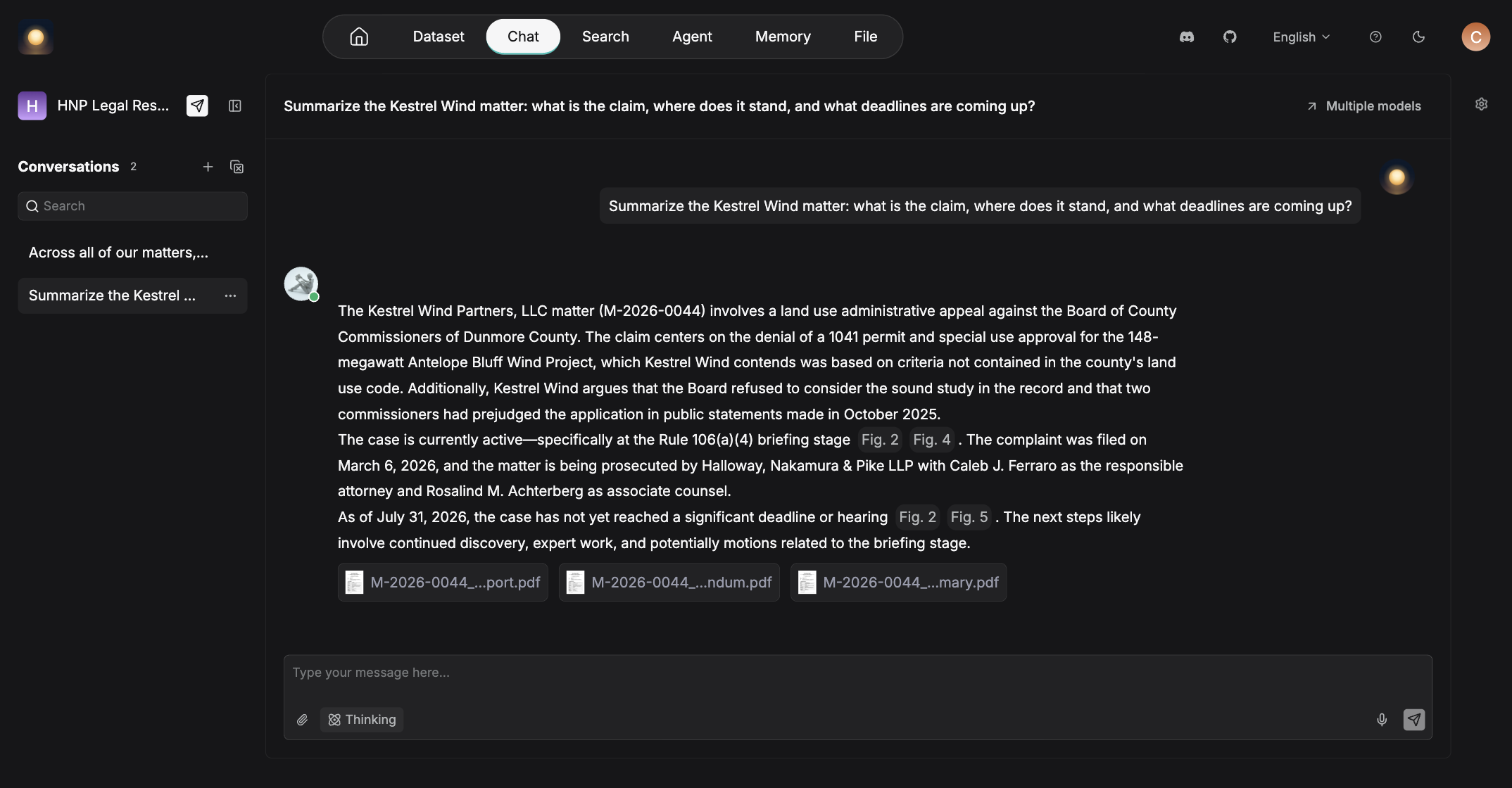
The part your case management software cannot do
The real unlock is not searching inside a matter. It is asking one question of every matter at once.
Nothing in a folder-shaped system can answer that, because the answer is spread across folders that were never meant to talk to each other.
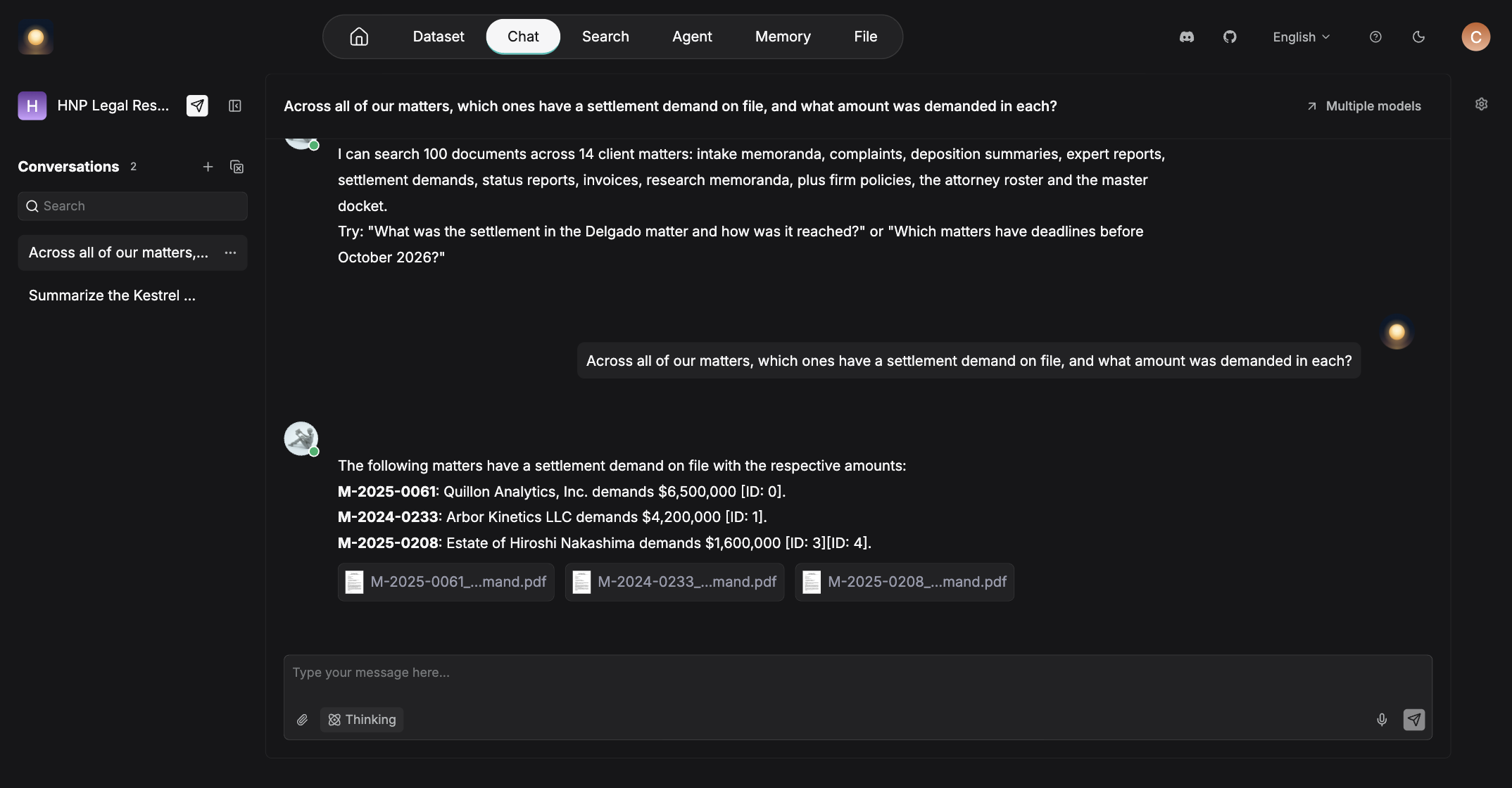
- Which matters have an open settlement demand, and for how much?
- Have we briefed this issue before, and in which case?
- What has our position been on fee shifting over the last three years?
- Which files mention this opposing expert, and what did they say?
- Which matters have a deadline before the end of the quarter?
That is institutional memory, and at most firms it currently lives in one person's head and walks out the door when they retire.
What it can read
A law office does not store its knowledge in one tidy format. There are PDFs from the court, Word documents from the last associate, a spreadsheet of medical specials, an email nobody printed, and a box of scans from 2014. The AI Paralegal takes all of it.
Scans without a text layer go through character recognition on the way in, so the 2014 box gets searched alongside everything filed this morning. Anything the firm can put in a folder, it can put in the library.
Where the documents come from
Most firms start with a folder. Point it at the matter folders on your network drive and everything in them becomes searchable. That is the whole setup for a lot of offices, and it is the one we suggest first, because it needs no accounts, no new permissions, and nothing from anybody's IT vendor.
If the files you want it to know already live somewhere else, it connects there instead, and keeps up as things change rather than needing a re-upload.
- A folder on your network drive
- Windows, SMB or NAS file share
- Google Drive
- OneDrive
- SharePoint
- Dropbox
- Box
- SeaFile
- WebDAV
- Amazon S3
- Azure Blob Storage
- Google Cloud Storage
- Oracle Storage
- Cloudflare R2
- Outlook and Microsoft 365
- Gmail
- Any IMAP mailbox
- Microsoft Teams
- Slack
- Notion
- Confluence
- Jira
- Asana
- Zendesk
- Salesforce
- PostgreSQL
- MySQL
- BigQuery
- Airtable
- Any REST API
- RSS or Atom feed
You can mix them. A network folder for the case files, SharePoint for firm policies, and a mailbox for correspondence is a perfectly normal setup, and the answers cite across all of it.
Where it runs is your call
Client files are the one category of data a firm cannot be casual with, so this is not a decision we make on your behalf. The AI Paralegal runs either on a machine in your own office or on a private server we host and manage for you. Same product, same answers, same citations. What changes is where the documents sit and who owns the box.
Either way it is your own library rather than a pool shared with other firms, and either way we build it, load it and manage it. Access is granted per person and separate collections stay separate, which is how a screened matter stays screened. If you are not sure which one fits, that is a five minute conversation, and starting on one and moving to the other later is not a rebuild.
What the firm actually uses it for
- ✓ Getting current on a file before a call, without reading the file
- ✓ Finding the passage in the deposition instead of scrolling the transcript
- ✓ Pulling every document that mentions a party, an expert, or an entity
- ✓ Answering "have we done one of these before?" before drafting a new one
- ✓ A first draft of a chronology or case summary, built from the file itself
- ✓ Checking what your own engagement letter says when a client asks about a cost
- ✓ Onboarding a new hire who can ask the firm questions instead of interrupting people
Where the line is
The AI Paralegal retrieves, summarizes, and cites. It does not practice law, and it is not sold as though it does. Everything it produces is a starting point for a person who is going to check it, the same way you would check a first-year associate's memo. It shows its sources specifically so that check takes seconds instead of an afternoon.
Firms that treat it as a very fast research assistant get a great deal out of it. Firms that want an oracle should not buy one, from us or from anybody else.
How a firm gets one
- We scope it. Which documents it should know, who should be able to ask, and the questions you want it answering on day one.
- We install it. On your network or on a private server we host, loaded with your documents and tuned to how your firm names and files things.
- We keep it current. New documents get added on whatever rhythm suits the firm, and we manage the machine so nobody on your staff has to.
Questions firms ask
Where does our data actually live?
Wherever you decide. On premise, the documents, the search index and the model that reads them all sit on hardware we install on your own network, and nothing leaves the building. Hosted, the same stack runs on a private server we manage, as your own instance rather than a pool shared with other firms. In both cases it is your library and nothing in it is used to train anyone's model.
Which one should we choose?
If a client, an insurer or your own policy requires client data to stay on site, choose on premise. If you would rather not own a server, or you have people working from home, from court, or from a second office, hosted is simpler and quicker to stand up. Moving from one to the other later is not a rebuild.
What kinds of documents can it read?
PDF, DOC, DOCX and TXT for documents; MD, MDX and HTML for notes and saved web pages; EML for email; XLS, XLSX, CSV and JSON for spreadsheets and data; PPT and PPTX for slides; and JPEG, JPG, PNG, TIF and GIF for scans and images. Scans without a text layer are put through character recognition when they are loaded, so old scanned files are not left out.
Do we have to upload everything by hand?
No. Most firms just point it at a folder on the network drive, or at a Windows, SMB or NAS file share, and leave it there. If your documents live somewhere else it connects directly: Google Drive, OneDrive, SharePoint, Dropbox, Box, Amazon S3, Azure Blob Storage, Outlook, Gmail, Teams, Slack, Notion, Confluence, Jira, Salesforce and others. Connected sources keep up as documents change, so nothing has to be re-uploaded.
Can it write, or only find?
It can draft summaries, chronologies, and first passes at memos built from your own documents. Every one of those is a draft for a person to review, and it cites what it used so the review is quick.
Does it replace a paralegal?
No. It removes the hunting from the job. The paralegal still does the work that requires judgment, and spends less of the day opening PDFs to find one paragraph.
Can we control who sees what?
Yes. Access is granted per person, and collections are kept separate from each other, which is how a screened matter stays screened.
Do we have to leave our practice management system?
No. It sits alongside whatever you already use. Nothing about your filing, your billing, or your workflow has to change.
What does it cost?
On premise, hardware plus a setup fee, then a flat monthly for management and updates. Hosted, a setup fee and a flat monthly with no hardware to buy. Either way it is quoted once we have seen the size and shape of your document set.
How is this different from the AI receptionist employee?
The receptionist works the front of the firm, answering and qualifying the calls that come in. The AI Paralegal works the back of the firm, answering questions about the files you already have. Firms usually start with one and add the other.
Related: the AI Paralegal is one way to run private AI on your own documents, and it pairs with our AI receptionist employee for law firms. It sits inside AI for law firms. The on-premise and private-instance choice is self-hosted and on-premise AI.
Ask about the AI Paralegal.
Fifteen minutes with the founder. Bring a question you would normally have to go digging for, and we will show you what answering it looks like.
Already a client? Mention it and we will scope it against your existing setup.